It started with a very simple and very innocent idea.
I wanted to create my own CV in pure Java. No big framework. No fancy designer tool. No “let’s overengineer everything before I even have one page.” Just Java and PDFBox.
And at first I thought: okay, how hard can it be?
Famous last words.
The classic PDF loop
Very quickly I found myself inside the loop every developer who has touched PDFBox or iText knows by heart:
write coordinates → render the PDF → open it → look at it → something is slightly wrong → change coordinates → render again → open again → repeat until your soul leaves your body.
One block is too low. One text line sits too close to the next. One section does not fit. One font change breaks the whole page.
And the funny part is that nothing was technically wrong. PDFBox was doing exactly what I asked. The problem was that I was asking the wrong way.
I was talking to the PDF like a machine:
“Draw this text at x = 42, y = 713.”
But in my head I was thinking like a human:
“I want the title at the top, centered, in a strong font. Then a divider. Then a section. Then some text. And if the content grows, please move things properly.”
That is the gap. Humans think in layout intent. Low-level PDF libraries think in drawing commands. And between those two things there is pain. A lot of pain.
The moment it clicked
I made the first CV page work. It looked clean. And then I asked myself a few very simple questions.
What happens if I change the data? Everything moves. What happens if I change the font? Everything moves. What happens if one paragraph gets longer? Congratulations — now you are manually debugging pagination.
And at that moment I had a very clear feeling: no. This is not how document generation should feel.
Because when we imagine a document, we do not imagine coordinates. Nobody thinks “ah yes, I want my professional summary at x 58, y 492.” We think: a header, then a section, then a block of text, then a table, then maybe an image centered, then a page break if it does not fit.
We think in hierarchy. We think in structure. We think in visual meaning.
So that became the real idea behind GraphCompose. Not “make PDFBox easier” — that would be too small. The real idea was: what if a Java developer could describe a document the way they actually see it? Structure first. Intent first. Then let the engine calculate the boring part.
Describe intent, not coordinates
Here is what that looks like. This is a hero block — a title and subtitle on a rounded panel with a coloured accent strip:
try (DocumentSession document = GraphCompose.document(Path.of("hello.pdf"))
        .pageSize(DocumentPageSize.A4)
        .pageBackground(cream)
        .margin(28, 28, 28, 28)
        .create()) {

    document.pageFlow(page -> page
            .addSection("Hero", section -> section
                    .softPanel(panel, 10, 14)          // rounded background panel
                    .accentLeft(accent, 4)             // coloured accent strip
                    .addParagraph(p -> p.text("GraphCompose").textStyle(h1))
                    .addParagraph(p -> p.text("A hero, and not a single coordinate.")
                            .textStyle(body))));

    document.buildPdf();
}
Notice what is not there. I never say “put this at (56, 740).” I say: this section has a panel behind it, an accent strip on the left, a title, and a subtitle. The engine measures the text, sizes the panel to fit it, places everything, and — when content is longer than a page — paginates it for me.
Coordinates are not bad. Coordinates are necessary. But they should be the engine’s problem, not something I re-solve by hand every time a font size changes.
If you have written Jetpack Compose, SwiftUI, or React, this will feel familiar: a declarative tree of what the document contains, not a script of drawing calls.
The bigger realization: coordinates are everywhere
At the start, GraphCompose was tied closely to PDF. But then I started seeing a bigger picture.
Coordinates are not only a PDF thing. PDF has coordinates. Images have coordinates. SVG has coordinates. Slides have coordinates. Even UI rendering is coordinates at some level.
So the real question was never “how do I draw this with PDFBox?” The real question was:
“How do I describe the thing once, resolve its layout, and then let a backend draw it?”
That changed the whole direction. The engine should not be married to PDFBox. The engine should understand documents — “this block is here, this table row continues on the next page, this layer is above that one, this paragraph can split.” The backend should understand drawing. PDFBox draws PDF. Apache POI writes DOCX. A future backend could do slides, or SVG, or images. Different output, same resolved layout.
That separation is where GraphCompose stopped being “my CV generator” and started being something more interesting.
Under the hood: an ECS brain with a semantic face
For a while, the engine was built ECS-style — the entity-component-system pattern from game engines. Entities are just identities; you attach components (size, padding, content, placement, parent, children order); and systems process them (one measures, one lays out, one paginates, one renders).
That was genuinely powerful. Want a new property? Add a component. Want a new primitive? If the engine already knows how to place an atomic rectangle, adding a circle is not a new universe — a circle has a radius instead of width/height, but from the layout engine’s point of view both are atomic objects that take space and can move to the next page. The engine doesn’t panic; it already knows the rules.
But ECS has one problem: it is a great engine brain, and a poor engine face. No developer wants to build a CV by writing “create an entity with a label marker, a content-size component, a padding component, a parent component, a render component…”
So the public surface became a semantic document model, while ECS-style thinking stayed inside. The contract is now clean:
- Your application code describes semantic nodes.
- The engine compiles them into layout fragments.
- Pagination resolves where everything goes.
- The backend renders the result.
ECS is a good engine brain. A semantic DSL is a good human interface. The public side got simpler; the inside got more structured. That is usually a good sign.
The feature I’m proudest of: you can test a document
This is the part most PDF libraries have no answer for, and the reason I keep using my own.
Ask yourself: how do you unit-test a PDF? Diff the raw bytes? They change on every timestamp and object ID. Open it and look? That doesn’t run in CI. So most teams don’t test their documents at all — and layout regressions get discovered by a customer.
Because GraphCompose renders in two passes, it compiles your document into a deterministic layout graph — every node with its resolved position, size, and page number — before a single PDF byte is written. That layer is machine-independent, so you can snapshot it and assert on it:
@Test
void invoiceLayoutStaysStable() throws Exception {
    try (DocumentSession document = GraphCompose.document()
            .pageSize(DocumentPageSize.A4)
            .margin(22, 22, 22, 22)
            .create()) {

        document.pageFlow(page -> page
                .addSection("Invoice", section -> section
                        .addParagraph(p -> p.text("Acme Corp — March"))));

        // First run records a baseline. Later runs FAIL if any node moves,
        // a page break shifts, or the page count changes.
        LayoutSnapshotAssertions.assertMatches(document, "invoices/acme_march");
    }
}
Now a layout change is a diff in a pull request, not a surprise in production. If someone tweaks a theme and it pushes the totals table onto page 2, the test goes red and the JSON diff shows exactly which node moved. The snapshot deliberately captures the stable things — geometry, pagination, order, dimensions — and ignores the noisy ones (colours, raw text, PDF resource IDs), so it doesn’t flap.
And when you do care about pixels — fonts rendering right, brand colours, anti-aliasing — there’s a heavier gate: PdfVisualRegression rasterizes the finished PDF and compares it against a checked-in baseline image.
So you get a pyramid: unit tests prove your math, layout snapshots prove geometry and pagination, visual regression proves the rendered pixels. Your document templates stop being write-once-pray-forever and become code you can refactor with confidence.
Why this and not the tools you already know
These are all good tools — GraphCompose is a different altitude, and it uses PDFBox underneath as its renderer. The comparison is about the authoring surface, not the renderer.
- vs. PDFBox / OpenPDF — they give you primitives and full coordinate control, perfect for parsing and stamping. For structured documents from data, you’ll rebuild measurement, wrapping, and pagination yourself. GraphCompose is that missing layer.
- vs. iText 7 — genuinely capable, but AGPL or commercial. GraphCompose is MIT — use it in a closed product, no strings.
- vs. JasperReports — XML templates you design in a tool and compile to
.jasper. Great when a non-developer owns the layout; worse when the document layout is product logic that changes with your code and should be reviewed in the same PR. - vs. HTML-to-PDF — tempting because you know CSS, but now you ship and operate a browser, and print-CSS pagination is its own dark art. GraphCompose has a layout pipeline built for paged documents from the start.
| Authoring surface | Layout | License | |
|---|---|---|---|
| GraphCompose | Java DSL, semantic nodes | Deterministic, snapshot-testable | MIT |
| PDFBox | Low-level primitives | Manual coordinates | Apache 2.0 |
| iText 7 | Layout API + canvas | Automatic | AGPL / commercial |
| JasperReports | XML → .jasper | Template-driven | LGPL |
GraphCompose sits deliberately in the middle: higher-level than PDFBox, lighter than JasperReports, free of iText’s licensing tax.
Is it fast? Yes — and it scales better than I expected
Let me answer two different questions, because they have different answers.
First: did the architecture rewrite make it faster? Not really — and that’s fine. When I moved from the ECS internals to the semantic model, performance did not explode. Tiny deltas, 0.14 ms here, 0.16 ms there. The win I was after was the design, not half a millisecond. Performance is nice, but if nobody can use the thing without reading your brain first, performance does not save you.
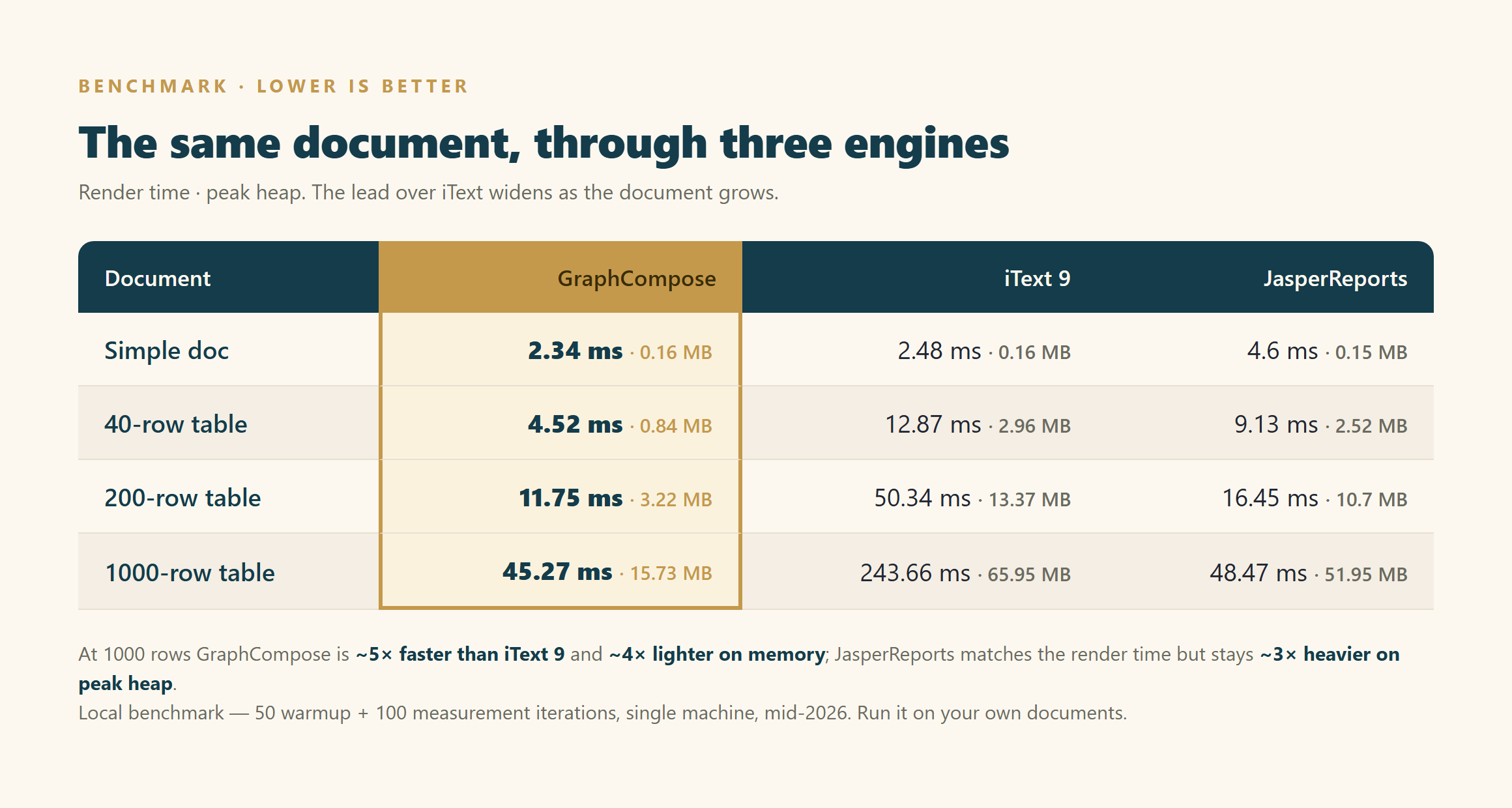
Second, and more interesting: how does the finished engine compare to the tools people actually reach for? I benchmarked the same documents through GraphCompose, the current iText 9, and JasperReports — measuring render time and peak heap. On a small document everything is close. The real difference shows up as the document grows:
| The same document, three engines | GraphCompose | iText 9 | JasperReports |
|---|---|---|---|
| Simple doc | 2.34 ms · 0.16 MB | 2.48 ms · 0.16 MB | 4.6 ms · 0.15 MB |
| 40-row table | 4.52 ms · 0.84 MB | 12.87 ms · 2.96 MB | 9.13 ms · 2.52 MB |
| 200-row table | 11.75 ms · 3.22 MB | 50.34 ms · 13.37 MB | 16.45 ms · 10.7 MB |
| 1000-row table | 45.27 ms · 15.73 MB | 243.66 ms · 65.95 MB | 48.47 ms · 51.95 MB |
(render time · peak heap; lower is better)
Two things stand out:
- Against iText 9, the lead widens with size. A small doc is roughly a tie; a 40-row table is ~2.8× faster; a 200-row table ~4.3×; and a 1000-row report is about 5× faster — while using ~4× less memory.
- Against JasperReports, time converges but memory doesn’t. Jasper closes to roughly the same render time by 1000 rows, but GraphCompose stays ~3× lighter on peak heap the whole way up.
Why? The deterministic two-pass layout doesn’t build a heavy per-row object graph — it measures, resolves, and streams. On the tabular business documents people actually generate at scale — invoices with a hundred line items, reports with thousands of rows — that architecture is exactly what pays off. It also means there’s no global lock on the hot path, so it scales across threads almost linearly (a stress run produced 5,000 documents across 50 threads in about 2.5 seconds, zero errors).
Fair print: these are my own benchmark numbers — a local machine, 50 warmup + 100 measurement iterations, one document shape per size, mid-2026. Not an independent third-party benchmark, so run it on your documents before you trust any multiple. But the shape of the curve — GraphCompose pulling away as documents grow — has been consistent every time I’ve measured it.
The Java 17 story — why open source is beautiful
For a long time GraphCompose required Java 21, and I didn’t think twice about it. I was busy with the fun stuff: layout, rendering, pagination, tests, templates.
Then a developer found the project, liked it, wanted to use it at work — and asked the obvious question I had completely missed: “Why is there no Java 17 support?”
And he was right. Many production Java stacks are still on 17. It’s not enough for the engine to be cool; if someone can’t use it in their real environment, the adoption story is already broken.
Then he did the thing that makes open source beautiful. @jottinger didn’t just file “please fix this.” He opened an issue pointing out exactly which Java 21 features were in the way, said backporting to 17 would widen the audience without hurting performance, and then offered: “Don’t worry, I can help. Some things will break, we’ll fix them, and the project keeps moving.” While he was in there, he refreshed dependencies too — which also improved Java 25 compatibility.
That is not noise. That is contribution.
When you build alone, you get blind spots. You are deep inside render handlers and layout snapshots, and someone from the outside sees the simple, important thing you missed — not because you’re careless, but because you were looking from inside the engine and they were looking from the user’s side. A small “why not Java 17?” made the library easier to try, the dependencies healthier, and the whole project more credible. No drama. Just “you’re right” and “okay, I’ll help.”
What 1.9 adds — “navigable”
The latest release makes a rendered PDF something you can move through, not just a flat sheet:
- In-document navigation — named
anchor(...)targets and internallink(...)jumps as native PDFGoToactions: clickable cross-references,[text](#heading)-style links, bidirectional footnotes. - A native table of contents —
addTableOfContents(...)with dot leaders and page numbers the engine resolves, plus live “see page N” references. - Bookmarks and viewer preferences — any section becomes a PDF outline entry.
- Multi-section documents — concatenate independently authored sections, each with its own page size and margins, into one PDF, with links resolving across boundaries.
- Inline chips, SVG icons, and colour emoji, and render-straight-to-images (
toImages(dpi)) with no PDF round-trip — ideal for thumbnails and pixel diffs.
All additive — 1.9 stays source- and binary-compatible with 1.8.
Where it fits, and where it doesn’t
Reach for it when you generate structured PDFs from data server-side — invoices, CVs, reports, proposals, statements, schedules — and want the layout to live in Java, be themeable, and be regression-tested.
Look elsewhere when you need a WYSIWYG editor for non-developers (this is code, by design), high-fidelity Word output (DOCX export exists but is semantic, lower fidelity than PDF), or low-level PDF surgery (use PDFBox directly — GraphCompose is the layer above it).
I’d rather you know the edges up front than find them in week two.
Try it
It’s on Maven Central, MIT-licensed, Java 17+:
<dependency>
    <groupId>io.github.demchaav</groupId>
    <artifactId>graph-compose</artifactId>
    <version>1.9.0</version>
</dependency>
Pure-text and standard-font documents need nothing else; curated fonts and colour emoji live in independently-versioned companion artifacts so an engine upgrade never re-downloads them.
- Repo & README: github.com/DemchaAV/GraphCompose
- Live showcase: demchaav.github.io/GraphCompose — the README banner is itself a GraphCompose document. The engine renders its own marketing.
The real idea
It started because I wanted to make a CV. Then PDFBox made me suffer. Then the suffering became architecture — which is probably how half of all libraries are born.
But the direction is clear now. GraphCompose is a Java-first declarative document layout engine: you describe what the document means, it resolves how the document should be placed, and a backend draws it. And the exciting part is that once you stop thinking only about PDF, the same idea reaches further — DOCX, slides, SVG, images, maybe visual editors later. Describe intent. Resolve layout. Render anywhere.
That’s the direction. And that’s why I kept building it.
Which library or method you reach for is always your call — PDFBox, iText, JasperReports, or something else entirely. I’m not here to tell you the tool you already trust is wrong. But maybe the thing I built gives you exactly the piece you were missing. You never know until you try it.
And if you do try it — or if it makes you angry — I genuinely want to hear about it. Open an issue, star the repo, or leave a comment. The most useful feedback always comes from the documents I never thought to test.
Describe what your document says. Let the engine count the pixels.
Originally published on Medium.