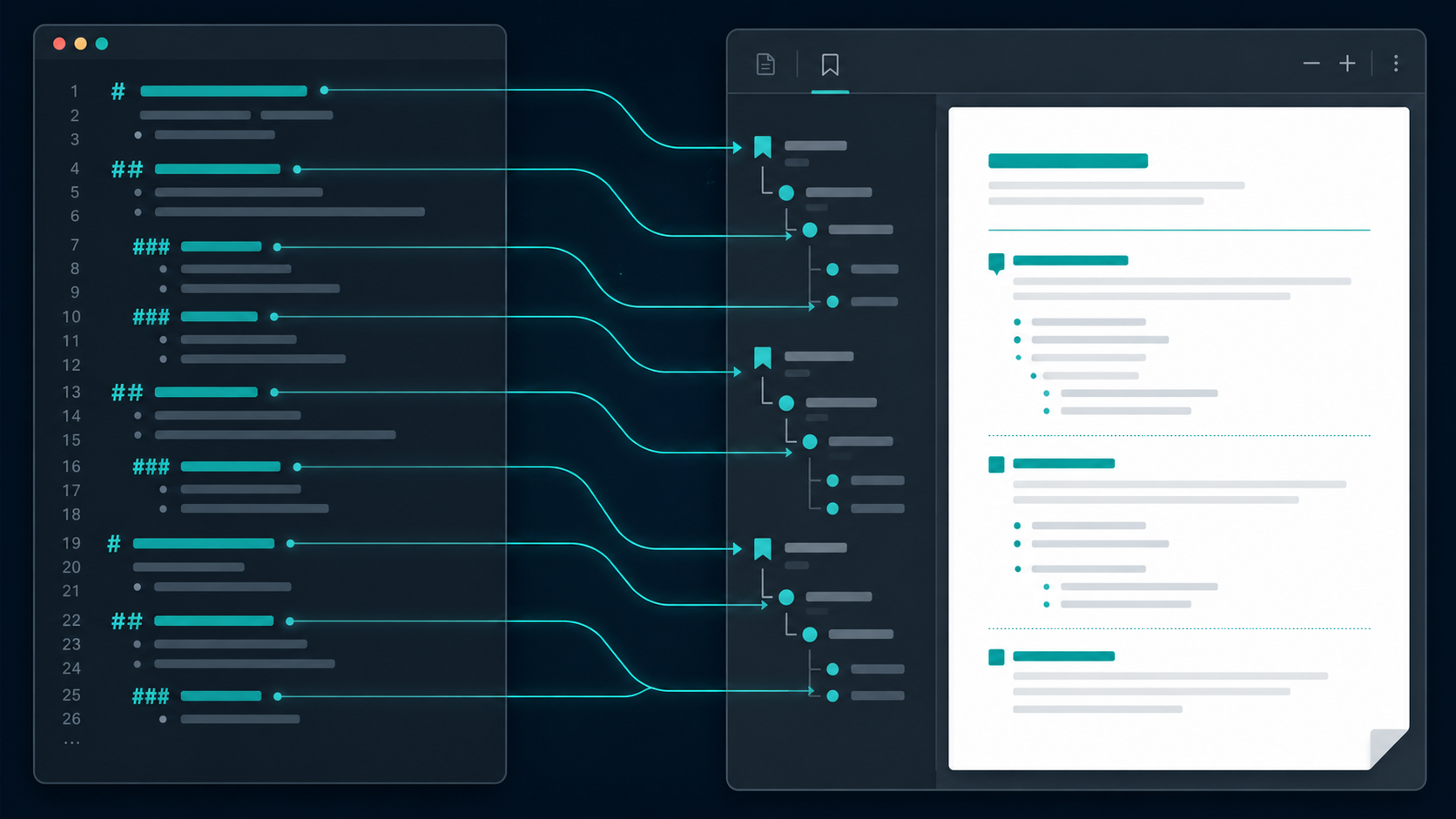
Update (July 2026). The first version of this post told one story — headings become a PDF bookmark outline. That’s still the heart of it, but the library grew a whole navigation layer since, and it just shipped to Maven Central as
io.github.demchaav:graph-compose-markdown:0.3.0. So here’s the fuller picture: the outline, plus working[text](#heading)jumps, an auto-generated[TOC], a page-numbered book-style contents, and bidirectional footnotes — all the same idea applied five times.
Take a long Markdown file — a spec, a README that grew too big, a design doc
with thirty sections. Convert it to PDF the usual way and you get a wall of
pages. To find the deployment section you scroll, or you Ctrl+F, or you guess
at a page number. The structure that was right there in your headings —
#, ##, ### — is gone. It rendered as bigger, bolder text and nothing
else.
It shouldn’t be gone. Those headings are the table of contents. A PDF can
carry a bookmark outline that the viewer shows in a side panel, nested exactly
like your headings, every entry a clickable jump. Open the panel, click
“Deployment,” you’re there. And that’s only the start of what a long document
should give you: a [TOC] you can click, cross-references ([see deployment](#deployment))
that actually jump, footnotes that take you down to the note and back up. That’s
the stuff almost every Markdown-to-PDF path drops on the floor.
I wanted my converter to keep all of it. The repo is graphcompose-markdown: it parses Markdown with Flexmark, maps it to its own semantic model, and renders that through the GraphCompose engine to a PDF. The headline is simple to state — a long document becomes one you can move around in — and the interesting part is how little code each piece took, because they’re all the same trick.
Why converters skip this
A PDF bookmark is not a heading. It’s an entry in a separate document outline
tree that lives outside the page content — a node with a title and a
destination (a page object plus coordinates), arranged in its own hierarchy
that the viewer renders in the bookmarks panel. The same is true of an internal
link: it’s a GoTo action pointing at a named destination, nothing to do with
the text that triggers it.
So to turn a heading into a bookmark — or a [text](#heading) into a real jump —
you need three things a naive converter doesn’t have lying around at the right
moment:
- The plain text of the heading. A heading like
## **Deploy** the servicecarries bold and code spans. The outline title has to readDeploy the service— markup stripped — or the panel shows raw asterisks and backticks. - The page and position the heading landed on. You don’t know that until the document is laid out and paginated, which happens long after you’ve walked the Markdown.
- A stable name, and a nesting level. An
h3under anh2under anh1has to nest as a tree. And every heading needs an anchor — the same one a[link](#anchor)and a[TOC]entry will target — or nothing resolves.
Most “md to pdf” tools render visually correct pages and stop. Everything above is extra plumbing against the PDF’s structure, decoupled from the text flow, and it’s easy to decide it’s not worth it. That’s the gap I cared about closing.
The mapping is (almost) one line per heading
The trick is that the layout engine already solves the hard parts. GraphCompose
owns measurement and pagination, and it supports a declarative bookmark on a
container that resolves to the right page after layout — the author never
touches coordinates. It also lets a paragraph declare a named anchor that
other content can jump to. So the Markdown renderer only does the cheap part:
pull the plain text, hand the heading level through as the outline depth, and
name the anchor.
Here’s the actual heading renderer, lightly trimmed to the navigation lines:
public void render(HeadingNode node, SectionBuilder host, RenderContext ctx) {
    RichText rich  = ctx.toRich(node.content(), ctx.headingInline(node.level()));
    String   title = ctx.inline().plainText(node.content()).strip();   // markup stripped

    // The slug this heading declares — planned up front so a [TOC] *above* it
    // (and any [link](#…)) resolves to the exact same anchor.
    String planned = ctx.headingSlug(node);
    String anchor  = planned != null ? planned : ctx.headingAnchor(title);

    host.addParagraph(p -> {
        p.rich(rich).anchor(anchor);                                  // ← link target
        if (!title.isEmpty()) {
            p.bookmark(new DocumentBookmarkOptions(title, node.level())); // ← outline entry
        }
    });
}
That’s the whole feature. plainText(...) flattens the inline tree so the
title is clean. node.level() — the 1–6 from the Markdown heading — becomes the
outline depth, so an h3 nests under the nearest h2. And .anchor(anchor)
makes the heading a named destination. Everything about which page and where
on it is the engine’s job, resolved after pagination; the renderer never has to
know.
If you read the first version of this post: the old snippet stopped at
bookmark(...). The.anchor(...)line is the addition that turned a read-only outline into a fully cross-linkable document — and it’s what the next four features hang off.
A document like this:
# Top
## Sub A
## Sub B
### Deep
comes out with an outline tree of exactly: Top at the root, Sub A and
Sub B nested under it, and Deep nested under Sub B. The Markdown nesting
is the PDF nesting, with no anchor ids to invent by hand and no manual two-pass
to discover page numbers. (I pinned this with a test that loads the rendered PDF
back with PDFBox and asserts the outline tree, because “it looked right in a
viewer” is not a regression guard.)
One more free win falls out of it: if a rendered document has at least one real
heading, the composer asks the viewer to open with the bookmark panel already
showing (openOutline is on by default; call openOutline(false) to turn it
off). A heading-less document is left alone, so you never get an empty panel.
The same move, four more times
Here’s the part I like: once “name an anchor now, let the engine bind it to a page later” is the shape of the heading renderer, every other navigation feature is that same shape again. None of them re-invent page resolution.
Internal links — [text](#heading). When the inline renderer sees a link
whose href is a #fragment, it slugifies the fragment and asks the engine for a
jump instead of a URL:
private static String internalAnchor(String url) {
    if (url == null || url.length() < 2 || url.charAt(0) != '#') return null;
    String slug = Slugs.slugify(url.substring(1));   // "#My Heading" -> "my-heading"
    return slug.isEmpty() ? null : slug;
}
// … then, in the link branch:  rich.linkTo(text, linkStyle, anchor);
linkTo(...) emits a native GoTo action, not a URL. Resolution is by name:
## My Heading declared my-heading (that .anchor(...) line above), and
[jump](#My Heading) reduces to the same slug, so the click lands. The slug rule
is GitHub’s, so the anchors you already know from READMEs just work.
[TOC] — a clickable contents, generated for you. A line whose entire text
is [TOC] (or [[_TOC_]]) becomes a TocNode, and the default renderer walks
the planned headings and emits one linkTo(...) per entry, indented by level:
for (TocEntry entry : entries) {                 // entries = ctx.tocEntries()
    double indent = indentPer * (entry.level() - minLevel);   // nest by heading level
    RichText rich = RichText.empty();
    rich.linkTo(entry.text(), linkStyle, entry.slug());       // same anchors as the headings
    toc.addParagraph(p -> p.rich(rich).margin(new DocumentInsets(0, 0, 0, indent)));
}
Because the slugs are planned before any block renders, a [TOC] at the top
of the file links correctly to headings that don’t exist yet when the marker is
rendered. No two-pass, no placeholder rewriting.
A page-numbered book contents. Sometimes you want the printed-book form —
Introduction .......... 3, dot leaders and page numbers — not a link list. Swap
one renderer:
MarkdownTheme.builder(DefaultMarkdownTheme.light())
        .renderer(TocNode.class, new BookTocRenderer("Contents"))
        .build();
and the same (label, slug) pairs go to the engine’s table-of-contents builder:
host.addTableOfContents(toc -> {
    toc.leader(DocumentLeader.DOTS);
    for (TocEntry entry : entries) {
        toc.entry(entry.text(), entry.slug());   // no page number in sight
    }
});
Notice what’s not there: a page number. The Markdown layer never counts a page. It hands over labels and anchor names and asks for a contents; the engine resolves each anchor to a concrete page on its own second layout pass and fills the leaders in. This is the thesis in its purest form — the converter states intent, the engine binds it to geometry after it knows the geometry.
Footnotes, both directions. A [^ref] citation and its end-of-document note
link both ways, and it’s the same primitive again — a pair of names and two
linkTo calls. The citation renders as a small [N] linked to fn-N; the note
declares fn-N and links its own marker back to fnref-N, which sits on the
first block that cited the footnote (list items and table cells included). Two
GoTo actions per footnote, zero coordinates computed here.
Why this lives below the converter, not in it
The thing I’d flag for anyone building something similar: don’t put the page resolution in the Markdown layer. It’s tempting — you have the AST, you could do a probe pass yourself. But then your converter owns a second layout pass, and that bookkeeping leaks into code that should only care about turning Markdown nodes into styled content. Do it once and you’ll do it again for the TOC, and again for footnotes, and now you have a pagination engine hiding in your converter.
Keeping the primitives declarative — bookmark(title, level), anchor(slug),
linkTo(text, style, slug), addTableOfContents(...) — meant every navigation
feature stayed a few lines that just name things. The engine decides what page
each name turns out to be. The same primitives back hand-authored documents too;
the Markdown converter is only one more caller. That separation is the reason the
heading renderer is one paragraph of code instead of a pagination engine of its
own — and the reason adding internal links, two flavors of TOC, and bidirectional
footnotes on top of it was cheap rather than a rewrite.
The payoff
Point it at a long Markdown file and you get a PDF you actually move around in:
the bookmark panel opens to your heading tree, [TOC] gives you a clickable
contents (or a page-numbered one if you want the book look), [link](#section)
cross-references jump, footnotes round-trip. For a thirty-section document that’s
the difference between a readable deliverable and a scroll wall.
The proof I trust most is that the library’s own user manual is rendered by the library — a page-numbered book contents with live page numbers, a “Page N of M” footer, vector emoji, and smart punctuation, all in one document, with a test that loads the result back through PDFBox and asserts the outline mode, the footer, and the resolved contents. If the navigation broke, the manual would fail to build.
It’s on Maven Central now, so it’s one dependency:
<dependency>
    <groupId>io.github.demchaav</groupId>
    <artifactId>graph-compose-markdown</artifactId>
    <version>0.3.0</version>
</dependency>
Requires Java 17. Both libraries are MIT-licensed. graphcompose-markdown (Flexmark → semantic model → themed PDF) is at github.com/DemchaAV/graphcompose-markdown; the engine underneath is github.com/DemchaAV/GraphCompose. Happy to get into the deferred anchor-resolution pass — that’s the part that makes all five one-liners above possible.