Install the harness into your coding agent, drop in a document reference, and ask
Claude Code, Codex or Gemini CLI to recreate it. The agent generates, renders, compares against the
reference and iterates until the template is ready for your approval — and what
comes out is maintainable GraphCompose Java, not a one-shot drawing.
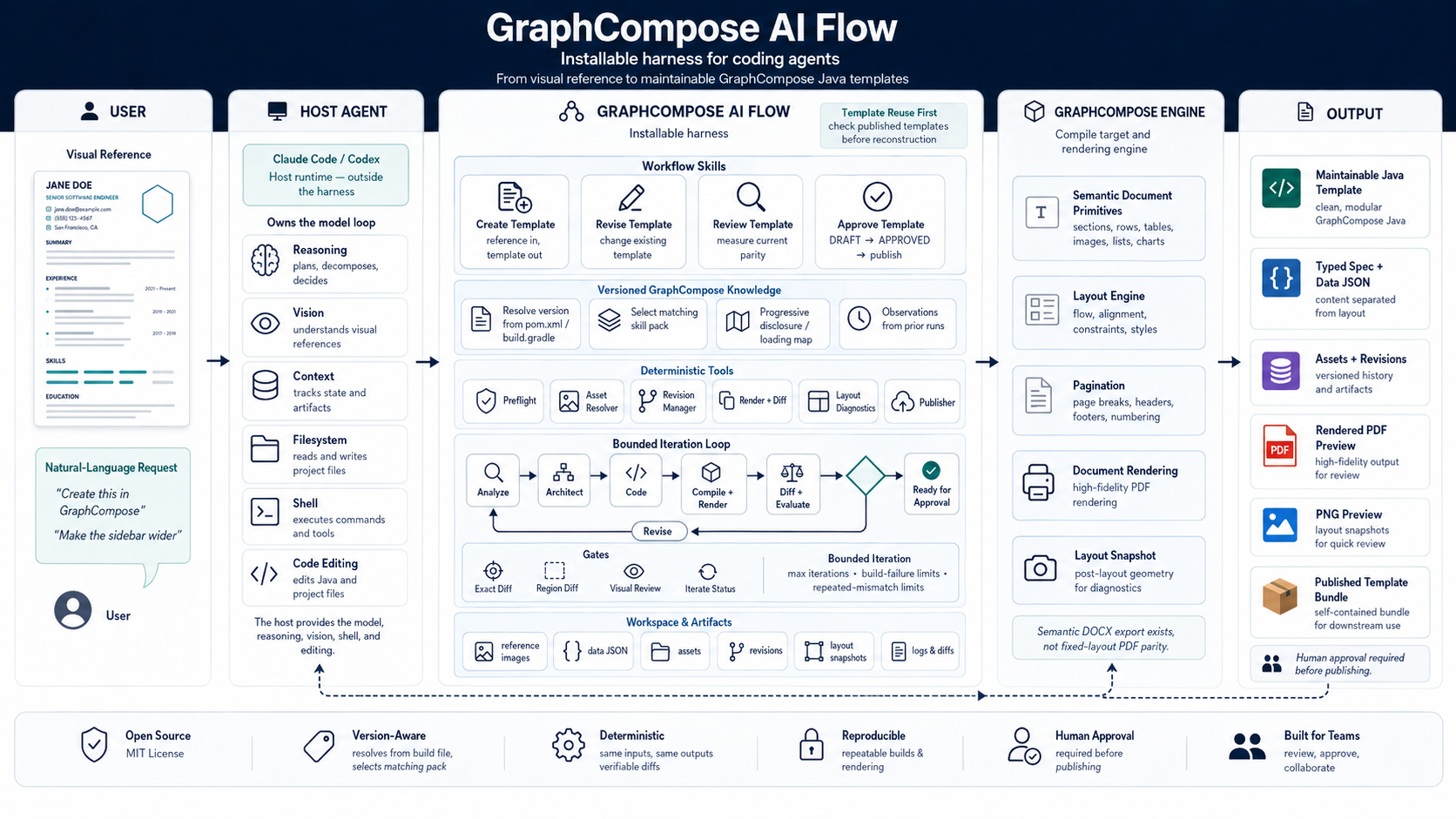
The harness sits between the host agent and GraphCompose. It owns the workflow,
the versioned API knowledge and the gates; the host owns the model.
Click to open full size.
01 · the loop, as it actually ran
Watch 31 revisions arrive.
Three runs, replayed revision by revision. The left panel is the reference the
harness was given; the right is what it rendered; the rail underneath is every
revision it took to get there, failures included.
Nothing in either frame is regenerated imagery — each step is the
render that revision actually produced, read back off disk.
Invoice
flowing table, repeated header, page numbering
12 revisions·113 min·approved at r012
12 revisions, 113 minutes.
The first two did not compile, which is the point of recording them: revision-001 and revision-002 are FAILED and still on disk, with what broke and what was tried. The last two were plain sentences with no instructions attached.
the dividers disappeared, for some reason
translated from the user’s Russian
Professional sidebar CV
photo, sidebar, timeline rail
10 revisions·120 min·approved at r010
10 revisions, 120 minutes.
From a screenshot and the sentence “Create this screenshot as a GraphCompose template.” The corrections in the second half are the ones worth reading: initials that must derive from the name rather than be hardcoded, a LinkedIn href that has to apply to the icon as well as the text, a timeline rail that should not run above its first marker.
Charcoal and gold CV
dark sidebar, rated skill rows, timeline rail
9 revisions·approved at r009
9 revisions, and the ninth was one sentence.
The loop declared itself ready at revision-008, after seven passes that each named one thing and fixed it — calibrate the type scale, drop the main column’s uniform 9px offset, seat the skill bullets in their own column. Then one sentence closed it. No duration is quoted here: the session stayed open across a long gap, so the telemetry measures the window rather than the work.
the timeline ring should close over the rail, not let it pass through
translated from the user’s Russian
All three were published as standalone bundles — template, typed spec, data JSON,
assets, previews — which is what the harness exists to produce. The same recordings
are in the
README as GIFs, and the revision
model behind the rail is in
docs/revision-model.md.
02 · one request, measured
How close does one request get?
A first render is never right. What matters is how close one request gets,
and what closing the rest costs. Both runs below are the reference, what
one request produced with no further input, and the result
after the corrections.
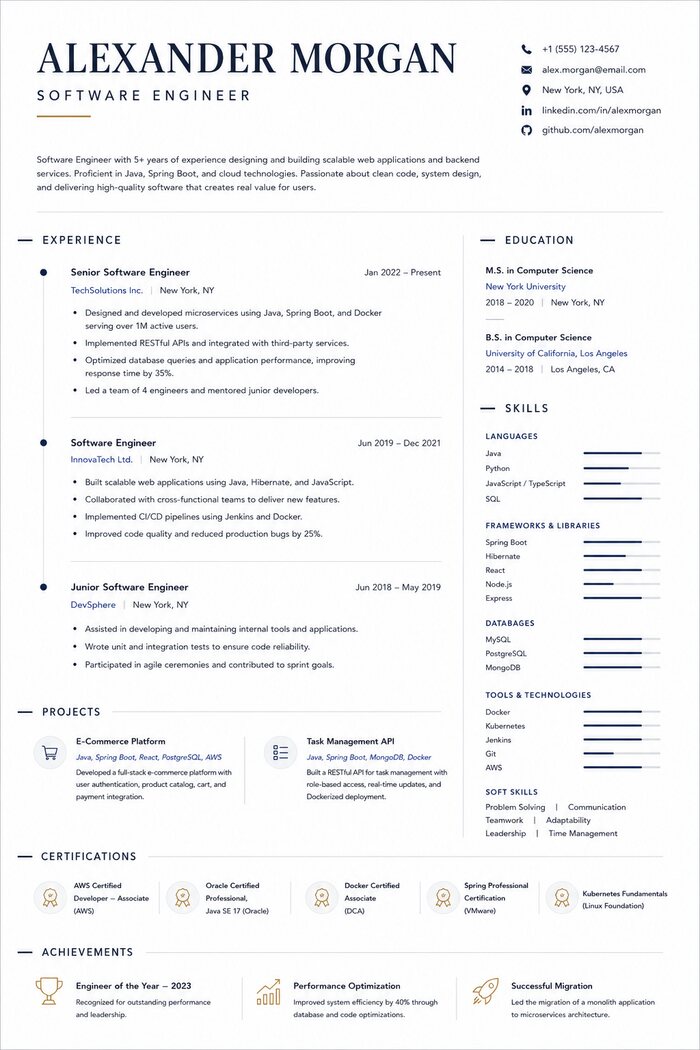
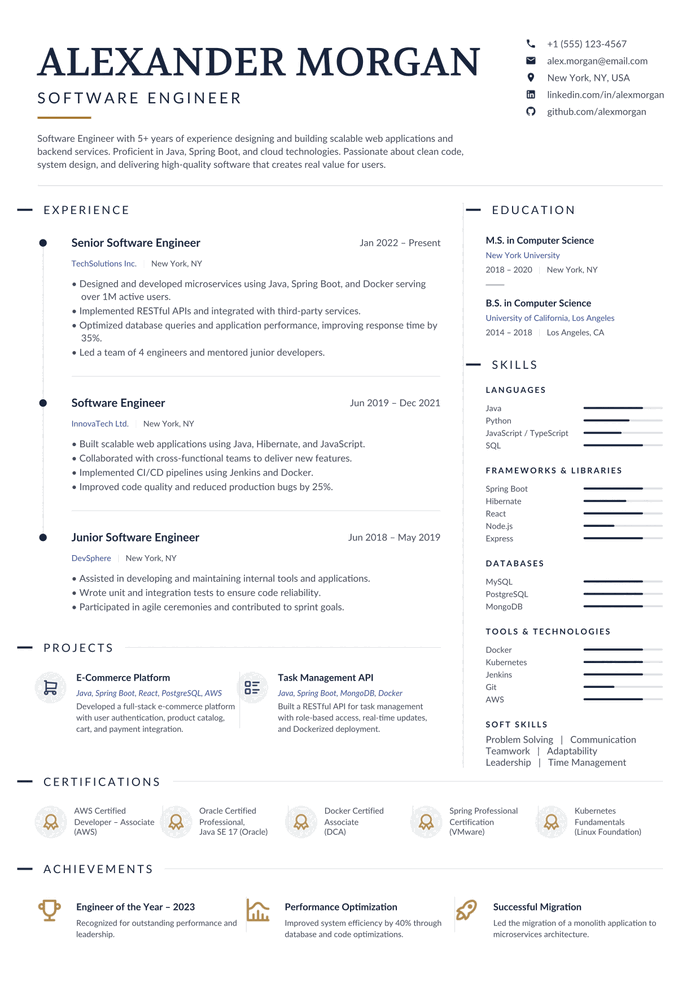
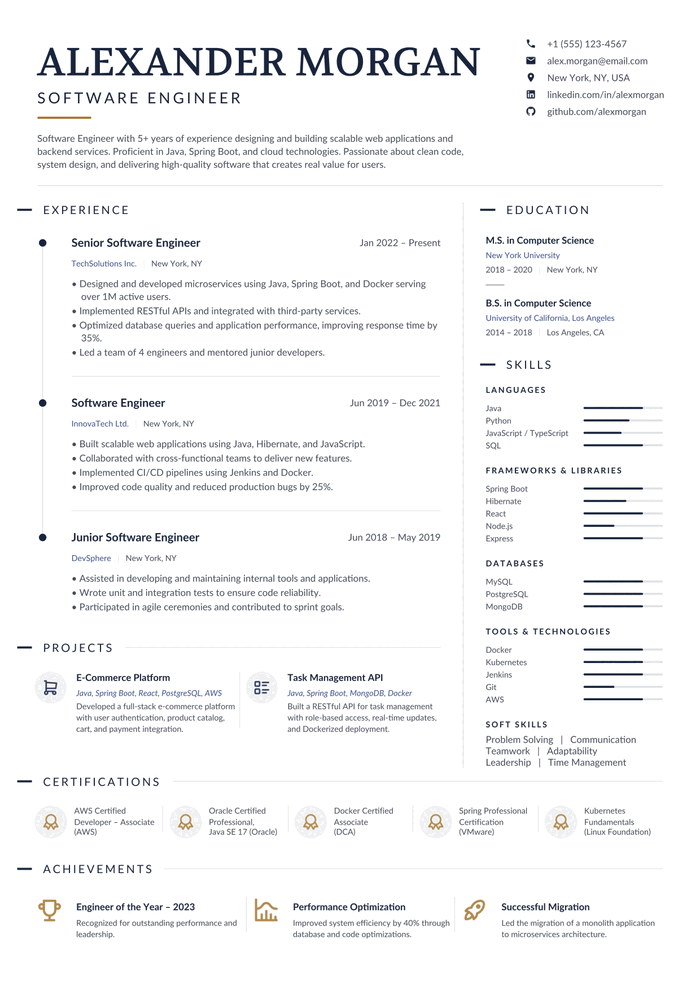
Two-column CV
photo, navy sidebar, timeline rail
5 revisions unattended·2 corrections·8 in total·77 min
ReferenceAfter one requestAfter 2 corrections
Both about the timeline: the rail overran its markers, and a job title drifted off centre.
Twice the loop could not tell a layout fault from a painting fault, so it wrote a probe — a throwaway document that renders one arrangement and measures the pixels — and settled it. Both findings are recorded observations now, with probes that re-confirm them.
Single-column CV
display serif, proportional skill bars, icon rows
8 revisions unattended·3 corrections·11 in total
ReferenceAfter one requestAfter 3 corrections
Three plain sentences about what looked wrong, none explaining how to fix it.
just the certification and achievement divider — vertical
translated from the user’s Russian
measured by the harness itself
create from the reference
68 min
280.4k output
61.0M cache read
first correction
7 min
25.2k output
16.0M cache read
second correction
10 min
36.4k output
21.8M cache read
approve and publish
2 min
8.1k output
6.5M cache read
A correction costs roughly a tenth of the original run.
Neither run was pixel-perfect from one request, and the pixel-similarity figure stayed unimpressive in both: the references are rasterised in typefaces no bundled family reproduces, so glyph edges dominate the comparison. The images are the evidence; the score is not.
03 · getting it
Install it into the agent you already use.
There is no service to sign up for and nothing to run alongside your editor. The
harness installs into the host as three packagings of the same
runtime, and after that the skills fire from plain sentences.
Then, once, inside the installed copy — ~/.claude/plugins/cache/graphcompose/graphcompose-flow/<version>/ — run npm run setup: two of the tools are TypeScript compiled into dist/, which is not committed. Again after every /plugin update, or let the first preflight of a run do it.
git clone https://github.com/DemchaAV/graphcompose-ai-flowcd graphcompose-ai-flownpm run setupnode adapters/codex/install.mjs
Copies the runtime to ~/.codex/graphcompose-flow/<version>/, so the clone is not needed afterwards — move it, rename it or delete it and the skills keep working.
git clone https://github.com/DemchaAV/graphcompose-ai-flowcd graphcompose-ai-flownpm run setupnode adapters/gemini/install.mjs
Gemini takes extensions rather than plugins, so this writes one to ~/.gemini/extensions/graphcompose-flow/ — commands, skill, hooks and runtime inside it. Restart, then gemini extensions list.
You need Node 20+, Java 21+, Maven and ImageMagick, plus a Java project that pins
io.github.demchaav:graph-compose — the version in your build file
decides which skill pack the agent authors against.
npm run setup
checks the whole toolchain before it builds anything.
Then say what you want.
“An invoice like the one we did before”
the catalog of published bundles is checked first — a match is a file copy into your project, not the loop
“Create this in GraphCompose”+ a screenshot
analyse → architecture → assets → code → compile → render → diff → fix the largest mismatch → repeat
“Make the sidebar wider”
a new revision under the narrowest scope that fits, gated against the right baseline
“What's still different?”
a measured verdict and a ranked mismatch list, without changing anything
“approve”
DRAFT → APPROVED, the previous approved superseded, the bundle published
Every render rewrites current.pdf next to the project, so one open
window follows the whole run — you watch the layout arrive instead of hunting for
the newest file under revisions/. It needs a viewer that reloads on
change and does not hold the file open.
04 · the shape of it
Three layers, and a boundary each one respects.
The host agent already has the model, the reasoning, the vision and the shell.
Rebuilding any of that would duplicate it and add nothing. What a host does
not have is how to reconstruct a document out of
GraphCompose primitives, when a change needs a new
revision, and what “close enough to the reference” means. That is the whole of
this project's job.
You
what you hand over
Visual referencea screenshot, a PDF, a design image
A sentence“Create this in GraphCompose”, “Make the sidebar wider”
Host agent
Claude Code · Codex · Gemini CLI — outside the harness, owns the model loop
Reasoningplans, decomposes, decides
Visionreads the reference image
Contexttracks state and artifacts
Filesystem + shellruns the tools, edits the Java
The project deliberately builds none of this: no LLM API client, no MCP server, no standalone runtime.
PDF and PNG previewsthe render, and the page it was diffed as
A published bundleself-contained: Java, data, assets, pom — no dependency on this harness
A human APPROVE is required before anything is published.
Reuse is checked before reconstruction. “An invoice like the one we
did before” consults the catalog of published bundles first — a match is a file copy
into your project, not the loop. The two cost different orders of magnitude, so the
question is asked before any of the above runs.
scope-routing.md
Verdicts, diffs and what each pass tried are on disk, not in a chat log.
The full split, including what this project deliberately does not build, is in
docs/architecture.md.
05 · how it works
Four skills. One bounded loop.
You say what you want; a workflow skill owns the request end to end. Behind it
the same ordered stages run — some are the model's judgement, most are a CLI,
and the last two are gates that decide with an exit code, not an opinion.
This is the moat against prompt-and-hope.
create-templateReference in, template out; loops until ready for approval.
revise-templateChange an existing template as a new revision, under the narrowest scope that fits.
review-templateMeasure and judge the current render; opens no revision.
approve-templateDRAFT to APPROVED, supersede the previous, publish the bundle.
01routellm scope the change; open/route the revision
02resolve-versiontool resolve GraphCompose version + skill pack
03validate-skillstool validate the skill pack against the target API
04visual-analysisllm ratios, anchors, regions from the reference
05check-discoverygate the three discovery artifacts validate — may the plan start (exit 0 clear / 1 held) scripts/check-analysis.mjs
06architecturellm map regions to primitives + theme tokens
07asset-resolvetool resolve Iconify icons + Google Fonts
08check-authoringgate plan and manifest validate and every requested asset has a record — may the template be written (--for authoring; render-and-diff runs it before a first render) scripts/check-analysis.mjs
09template-authoringllm write generated-template.java + data spec
11visual-evaluationgate parity classification vs reference/parent
12iterategate ask whether the loop may take another pass (0 ready / 2 revise / 3 blocked) scripts/iterate-status.mjs
the gate each scope ends on
exact-diffBinary pixel diff against the parent revision.vs the parent
region-diffRegion-aware pixel diff against the parent revision.vs the parent
visual-reviewLayer-by-layer review against the reference image.vs the reference
what ends the loop
8 iterations
3 build failures in a row
3 attempts at one mismatch
Reaching a bound with work still open is its own exit code, not a silent stop.
6 scopes route through these stages;
7 failure categories are declared for what can go wrong.
Which stages a scope runs, the gate it ends on and the loop bounds are declared once in
config/pipeline.json,
which this list is generated from at build time. The skills that run them live in
skills/workflows/.
06 · the moat
Why this isn't prompt-and-hope.
Most AI document tools are a prompt with a hopeful disposition. This one is closer
to a build pipeline: the work has contracts, outputs go through tests, regressions
get caught, and nothing ships without a human-signed APPROVE.
The gate is arithmetic
Three gates, one per kind of change. A refactor must produce AE == 0 against its parent. A data edit may differ only in the regions it touched. A visual change is reviewed layer by layer against the reference. The metric is quoted verbatim into the verdict, never paraphrased — "looks identical" is not a gate result.
Every change opens a new revision with DRAFT, APPROVED, REJECTED, REVERTED, SUPERSEDED or FAILED. Approving supersedes rather than replaces. The failed passes stay on disk with what broke and what was tried, and a single component can be restored from any earlier revision.
Your build file is read, the pinned line is mapped to a skill pack, and a line with no pack stops the run rather than being rounded to the nearest one. The pack's allow-list is a closed set: absent means the call does not exist. If a skill and the library disagree, the library wins.
Five fixture projects compile, test and render against GraphCompose 2.2.0 from Maven Central in CI, each render identical to its baseline. Five fixtures are a subset of what the packs describe, and the page says so rather than calling it coverage.
A separate tool counts the iterations, the consecutive build failures and the repeats of the same mismatch, and answers ready / revise / blocked with an exit code. It stops at 8 passes, 3 build failures in a row, or 3 attempts at one mismatch. An agent going round in circles is the last thing qualified to notice it.
The renderer writes GraphCompose’s own post-layout snapshot beside the PDF, so "this block sits too far right" is arithmetic. The diagnostics name the additive chain and the node that owns the offset rather than the one that shows it — and answer "I cannot derive this" instead of producing a number they cannot support.
When the loop cannot tell a layout fault from a painting fault, it writes a probe — a throwaway document that renders one arrangement and measures the pixels — and settles it. The finding is recorded with the probe that re-confirms it, so the next run does not pay for it twice.
Templates take their content through a typed spec loaded by a spec provider. Changing an email is one JSON change. If swapping the data means editing Java, the contract is broken and the review says so.
The review skill writes a structured verdict and the loop stops there. Publishing happens only when a person approves, and the publisher refuses any revision that is not APPROVED. The agent never marks its own work ready to ship.
Separate jobs run the revision manager, the visual diff, the preview renderer, the skill fixtures, the schema validation and a cross-cutting harness-contract check that fails when the routing, the schemas, the skills and the packaging stop agreeing. Node 20 + Java 21 + Maven.
GraphCompose is the compile target. The harness teaches the agent to speak it.
GraphCompose is a Java library for
building PDFs out of semantic primitives: sections, rows, tables,
themes, layer stacks, shape containers, layout snapshots and visual regression
checks. It treats a document as composable nodes, not as a canvas of
coordinates.
This project is the harness that targets GraphCompose as
a compile target. The agent receives a visual reference and
reconstructs it out of those primitives. The output is not a one-shot PDF — it
is a maintainable Java template you can read, diff and revise, with the content
in a JSON file beside it.
The library is resolved from Maven Central as
io.github.demchaav:graph-compose, and the version your build file pins
decides which knowledge the agent may use.
Six packs ship — 1.6.x, 1.7.x, 1.9.x, 2.2.x — and the
current one carries a source-generated allow-list plus a loading map that
answers given this task, which of its 16 files do I
open? A line with no pack stops the run.
skills/versions/
The shape the fixtures compile and render against
2.2.0 in CI: one named method per
visible region, geometry derived from a base constant, content out of the
data file.